
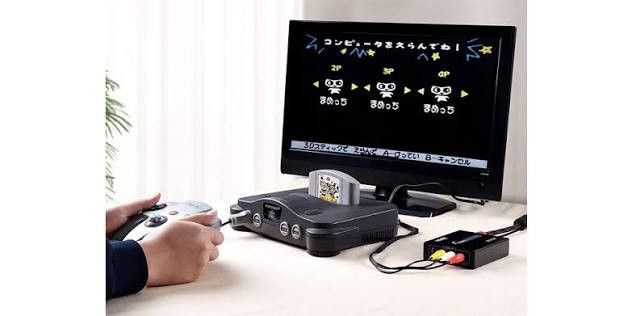
There's something special about playing a classic video game on its original hardware. But when you connect an older game system to a modern television, you may discover that things aren't quite as simple as they used to be.
Older consoles were designed for the televisions available at the time, while today's TVs rely heavily on HDMI connections. Fortunately, that doesn't mean you have to give up your original hardware.
Here are a few things to know when connecting retro video game systems to modern TVs.
Older Game Systems Use Different Connections
Many classic video game consoles were designed to connect to a television using older types of video connections.
One of the most familiar is composite AV, which uses the red, white, and yellow RCA plugs. The yellow connection carries the video, while the red and white connections carry the audio.
Many Nintendo, Sega, PlayStation, and other classic game systems can use this type of connection.
The problem is that many newer televisions no longer include these inputs.
Using an AV to HDMI Converter
If your older console uses red, white, and yellow RCA connections but your modern TV only has HDMI inputs, an AV to HDMI converter can provide a simple way to connect the two.
The console connects to the converter using its AV cables, and the converter connects to the television through HDMI.
These converters can be used with compatible game systems that use composite AV connections, including many Nintendo, Sega, PlayStation, and other classic consoles.
Game Repair carries RCA AV to HDMI converters in our Las Vegas store for customers who want to connect their older game systems to modern TVs.
Don't Expect an Old Game to Suddenly Look HD
This is important to understand.
An AV to HDMI converter allows an older video signal to work with an HDMI connection, but it doesn't turn the original game graphics into modern high-definition graphics.
Retro games were designed for the televisions and resolutions of their time. Depending on the console, game, converter, and television, the picture may look softer or different from what you remember.
That's normal.
Modern TVs Can Display Retro Games Differently
Older games were originally designed with CRT televisions in mind. Modern flat-screen televisions process and display those older signals differently.
You may notice differences in:
- Picture sharpness
- Colors
- Screen proportions
- Input response
- Overall appearance
Your television's picture settings can also make a difference.
If the TV has a Game Mode, it may be worth trying. Game Mode is designed to reduce some of the additional picture processing performed by modern televisions.
Check Your TV Before Buying Anything
Before purchasing a converter, take a look at the connections on the back or side of your television.
Some modern TVs still have composite AV inputs, while others only offer HDMI.
You should also check which type of connection your game console uses. Knowing what you have on both ends makes it much easier to determine what you actually need.
Keep Your Original Hardware Going
You don't necessarily need to replace your classic game systems just because you purchased a newer television.
With the proper connection or converter, many original consoles can still be enjoyed on today's TVs.
At Game Repair, we've spent more than 36 years working with video game systems from many different generations. We believe original hardware is an important part of the retro gaming experience, and we love seeing these older systems continue to be played and enjoyed.
Have an older game system you're trying to connect to a newer TV? Stop by Game Repair in Las Vegas. We can help you figure out what you need to get back to playing your games.